

Before you install Sothink SWF Decompiler, please make sure you have closed all IE browsers.
When you finish the installation, restart your IE browser.
You will find a small button of Sothink SWF Catcher is added to Internet Explorer's toolbar.
Step one: Launch Sothink SWF Catcher
Generally, when you see a great Flash movie, there are two ways to get it:
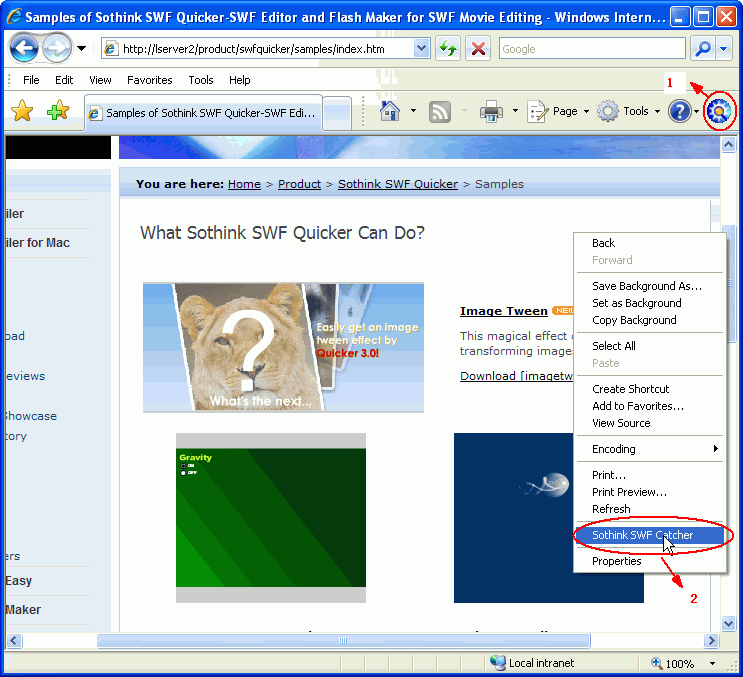
Step two: Save a captured Flash movie
Then the Save dialog will popup to show all the Flash movies in this page.

1. Choose movie you want to get:
Check the box in front of the Flash movie you want. You can also use "Select All" to choose all the Flash files and "Deselect All" to uncheck all.
2. Set a folder to save the captured movie:
Click the arrow button beside "Save to" to set the file saved directory. You can browse and choose a folder to store the Flash movie, use the default or the last saved directory as well.
3. Click "Save" button to store the Flash movie to your local disk successfully.
Preparation: Install Sothink Flash Downloader for Firefox.
Download Program: https://www.sothink.com/download/swfcatcher.xpi.
Installation Steps: https://www.sothink.com/product/swfcatcher/firefox/install.htm.
Note: If you met problems of Firebug conflict, please upgrade to Sothink Flash Downloader for Firefox V1.4.2.
After installing Sothink Flash Downloader for Firefox, you can use it to capture and save online SWF from Firefox. See following steps:
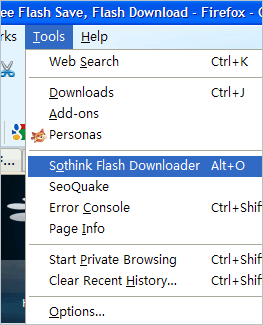
1. Please select Tools > Sothink Flash Downloader from the main menu of Firefox.
2. You will see the Sothink Flash Downloader For Firefox Sidebar now.
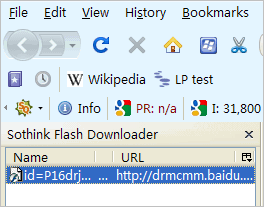
3. Open any web page that contains Flash movies. After the page has been loaded, the Flash movie contained in the web page will be listed in the Sidebar. Also, when you mouse over the SWF, a  icon will appear on the top left of the SWF.
Note: if you have installed Sothink SWF Decompiler, a  icon will also appear on the top left when you mouse over the SWF.
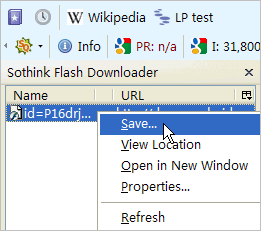
4. Now there are two ways to save the SWF to your local disk:
Method 1: Directly click the icon to save the desired SWF.
Method 2: Right click the Flash movie in the Sidebar and select "Save..". from the popup menu to save the Flash movie to your local disk.
Note: if you have installed Sothink SWF Decompiler, you can click the icon to save the target SWF as a FLA file.

